Introduction and Fundamental Architecture
Overview and guiding principles
The Unfract platform is an integrated software solution designed to centralize the key dimensions of business operations in a single work environment, eliminating the information fragmentation typical of using separate tools. The system architecture synergistically combines project management, business relationship control, collaborative document production, synchronous messaging, time scheduling, and advanced artificial intelligence capabilities. This operational guide is the complete reference manual for operational users, team leaders, and system administrators, offering an in-depth examination of both the user interfaces and the underlying logic governing data flow.
Unfract's architectural principles are based on operational context isolation, transparency in cloud resource usage, and automation of repetitive processes. Each platform feature is designed to operate within clearly defined parameters, enabling a seamless transition between high-level strategic consultation and detailed task execution. The constant presence of the intelligent assistant, natively integrated with project data, transforms the organization's static information into a dynamic resource capable of guiding daily operational decisions.
Hierarchical Architecture: Workspaces and Projects
Unfract's entire data structure is organized around two fundamental concepts that govern visibility, permissions, and resource distribution: Workspace and Project. The user interface requires the definition of these two global contexts from the first time you log in using the selectors in the main navigation bar. This selection is stored in the browser session state, ensuring that every navigation between the various modules maintains a strictly consistent information framework.
The Workspace is the primary organizational and legal container. It contains company records, staff composition, role assignments, overall disk storage quotas, and the amount of credits allocated to AI processing. The Project represents the vertical operational perimeter. Every single entity created in the platform—from board tasks to CRM records, from text documents to meeting recordings, to chat channels and AI sessions—is uniquely associated with a specific project. Changing the active project instantly filters the entire platform, displaying only the information relevant to the selected context.
Initial setup flow and global navigation
Access to the platform is via secure authentication based on traditional credentials or the single sign-on protocol offered by Google providers. Once logged in, the user is directed to the initial setup flow. This process involves creating or selecting a company Workspace and then initializing the first work project. During this phase, the system automatically prepares the database collections and sets the standard columns needed for operational management of tasks.
The side navigation bar forms the backbone of the user experience, allowing you to easily switch between the Project Overview (/dashboard), the Activities module (/), Documentation (/documentation), CRM (/crm), Calendar (/calendar), Meetings (/meetings), Chat (/chat), Organization Management (/organization), and the AI Hub (/ai-hub).
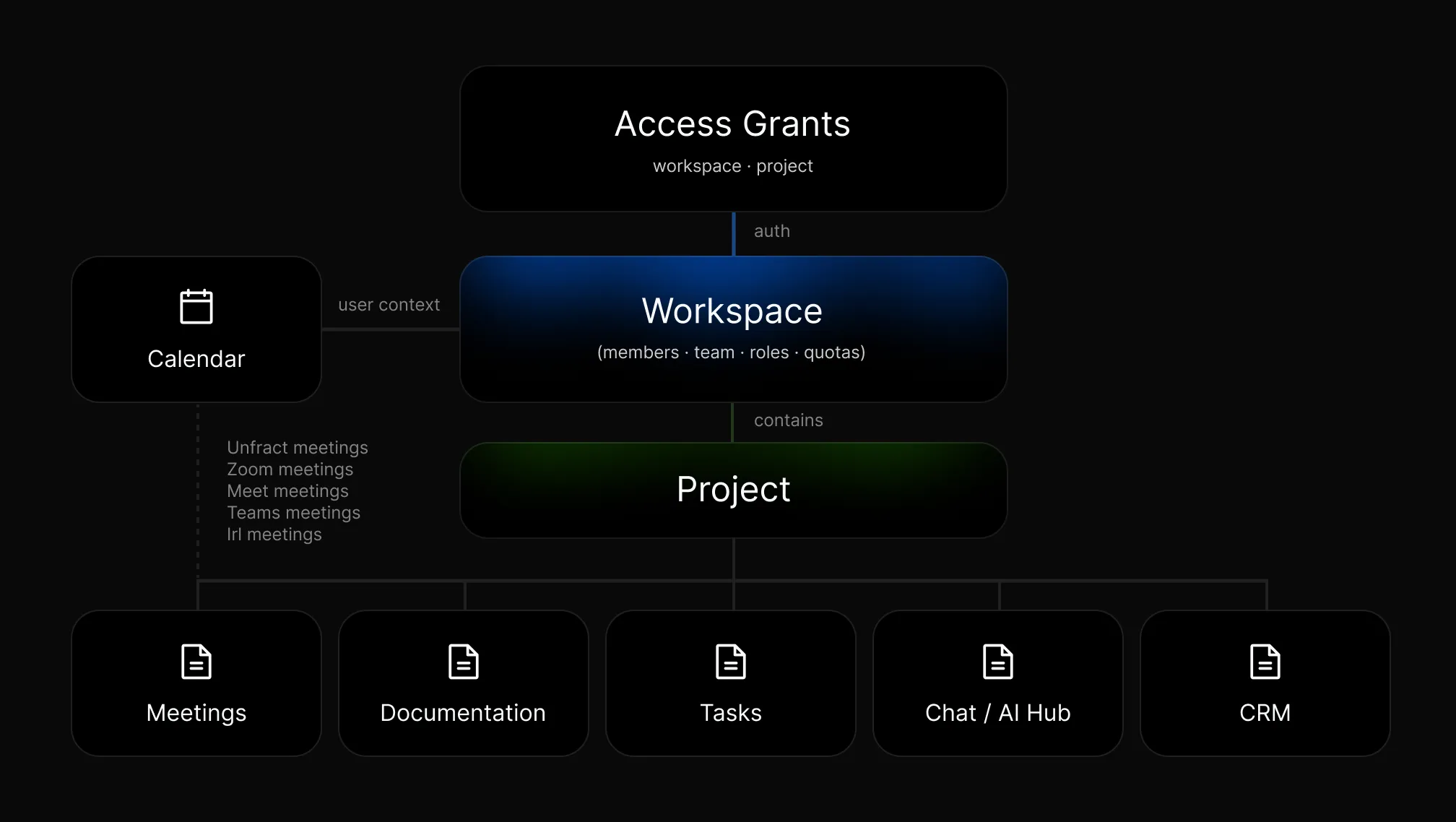
To ensure an orderly start of activities, administrators are recommended to invite team members immediately after creating the workspace and to configure the primary IAM roles before starting to draft documents or import business records.
Organization, Team, and IAM Security Management
Workspace Administration and Organizational Models
Corporate entities are managed within the Workspace administration panel. Administrators can define the organization's visual identity by uploading the official logo and cover images, as well as constantly monitoring the allocation of AI credits and overall storage space. The system allows the platform's behavior to be adapted to the company's organizational complexity by selecting three different operating modes.
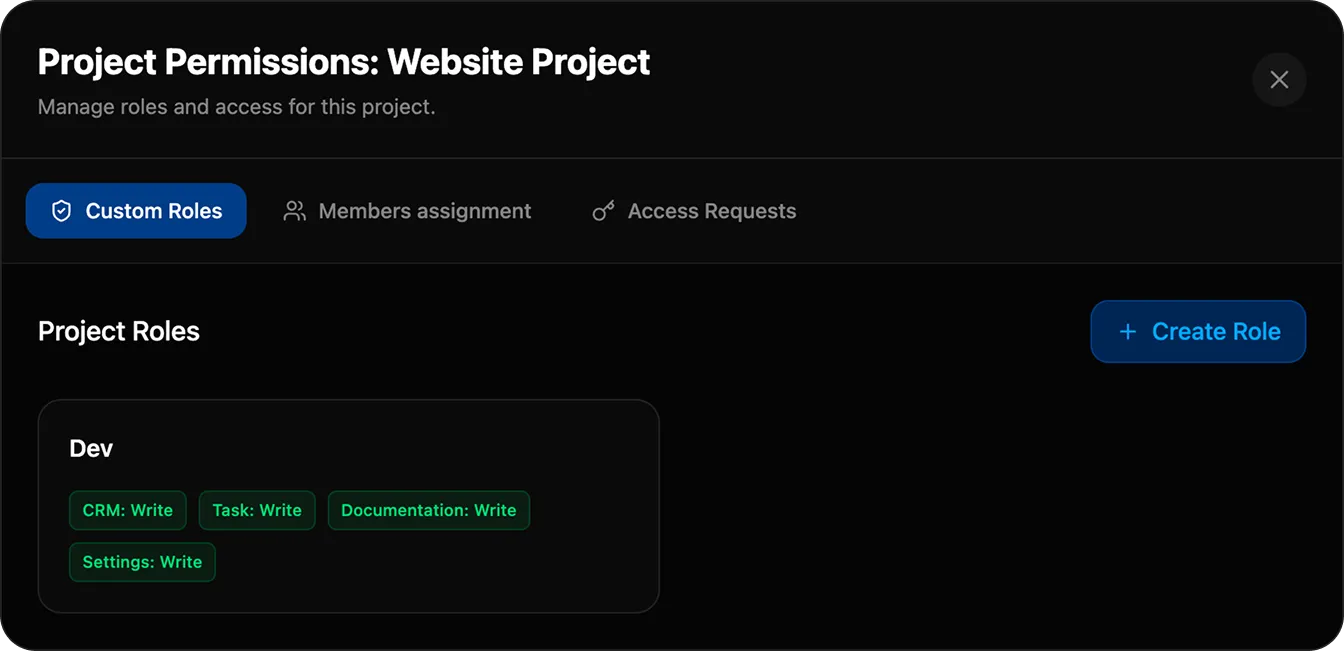
Flat mode is designed for lean organizations or small teams, where access to information must be open and free of hierarchies. Teams mode allows users to be divided into clearly defined work teams, allowing them to restrict access to specific projects or application modules based on their group membership. Corporate mode activates an advanced Identity and Access Management (IAM) system, enabling a granularized permission matrix designed for complex business environments subject to stringent governance and audit requirements.
Team Management, Onboarding, and Invitations
Onboarding new collaborators to the organization and its various projects is managed from the Organization section (/organization). Administrators can utilize two complementary onboarding methods. The first involves generating a unique invitation link that can be downloaded from the dashboard; users who access this link are directed to the registration screen and, once authenticated, are immediately associated with the organization with predefined roles. The second method involves sending an invitation directly via email using the platform's email services, providing formal tracking of the invitation's status.
Creating Teams allows you to group users into functional units such as development, marketing, or sales. When an entire team is associated with a Project, its members automatically inherit the access policies established for that group, greatly simplifying data maintenance operations with frequent staff turnover. Architecturally, the interface maintains legacy cross-references between Workspace and Organization entities to ensure full backward compatibility with pre-existing systems.
IAM Access Control Model and Granular Permissions
Unfract's security model governs access to information through a role-based permissions structure. For core modules such as CRM, Activities, Documentation, and Project Settings, the system allows you to assign three distinct privilege levels: no access ('none'), read-only ('read'), which allows viewing without making changes, and write ('write'), which grants full rights to create, modify, and delete entities.
The Calendar, Meetings, Chat, and AI Hub modules adopt an access model geared toward open collaboration within the workspace. In these sections, database security rules allow operations to authenticated users, entrusting the confidentiality of private conversations or personal sessions to the interface's application logic. System administrators still have complete visibility across all environments to ensure operational control of resources.
Tasks and Project Management Module
Operational Views: Kanban, List, and Gantt History
The Task Management module represents the operational core of project execution within Unfract. Accessible directly from the application's main page (/), this environment offers users three different viewing modes designed to meet various workflow planning and control needs.
The Kanban view provides a dynamic board with columns representing the progress of work, allowing for intuitive drag-and-drop movement of cards. The List view transforms tasks into a structured grid, ideal for applying complex filters, multi-field sorting, and quickly editing large volumes of tasks. The Timeline view offers a graphical Gantt-style timeline, visually correlating individual task deadlines with strategic macro-goals (Epics) across a monthly timeline.
Task lifecycle, metadata, and attachment integrity
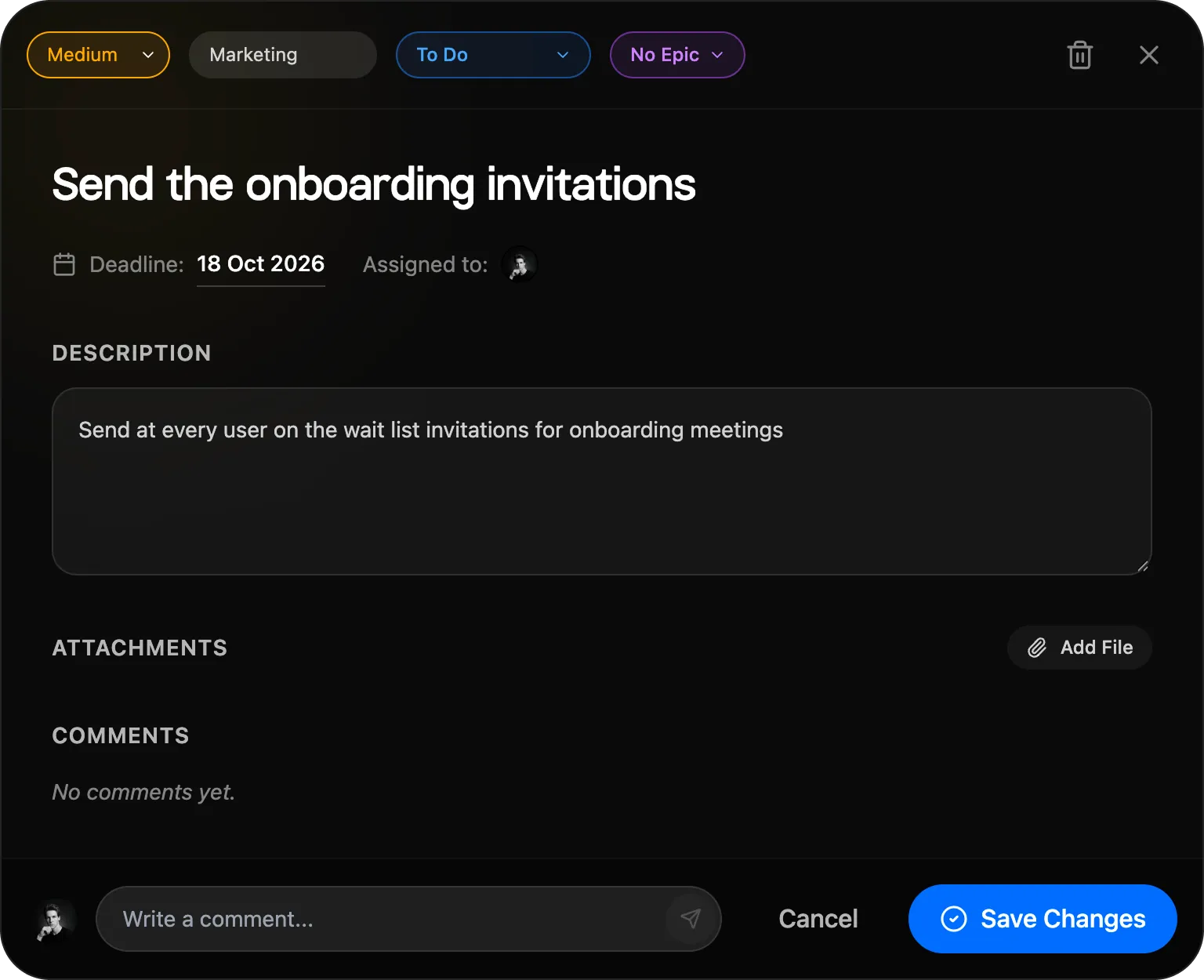
Creating a new task requires assigning it to the active project and defining a concise title. The operator can enhance the task sheet by specifying the priority level (Critical, High, Medium, or Low), setting the initial destination column, and defining parameters such as category, due date, extended description, and any link to an Epic. If multimedia attachments are present, the platform activates a control mechanism that prevents the task sheet from being permanently saved until the files are fully uploaded to storage, preventing the creation of incomplete references in the database.
The activity lifecycle continues through progressive updates that can be made both from the card detail panel and through direct interactions on the Kanban board. Moving a card within the default completion column ('Done') automatically changes the task's status. This change is instantly reflected in the AI Hub and summary dashboards, which consider the activity complete for statistical calculations and contextual analysis purposes.
Advanced collaboration, mentions and asset tracking
Collaboration on tasks is facilitated by a comments section integrated into each tab. Typing the '@' character in the text field activates the context menu for direct mentions of team members. Submitting a comment generates an automatic in-app notification and, based on individual preferences, an email notification to the mentioned users.
Attachments associated with tasks are stored in Firebase Storage infrastructure. The system calculates the exact size of each uploaded file and instantly updates the workspace's space usage counter. If an attachment or the entire task card is deleted, the system removes resources from the bucket and decreases the storage quota accordingly, ensuring rigorous consumption tracking.
CRM and Business Relationship Management
CRM data model and structuring of customer records
Unfract's CRM module (/crm) offers a comprehensive infrastructure for managing sales processes and tracking customer relationships. The data structure is divided into four specialized entities: Accounts, which represent customer organizations; Contacts, which record individual individuals; Customers, which track established contractual relationships; and Leads, which capture sales opportunities in the initial qualification phase.
Each profile can be enriched with custom fields, category tags, and history notes. The company profile acts as the central hub within the system, allowing you to view all associated contacts, sales negotiation history, filed contractual documents, and the history of interactions between various members of the sales team in a single integrated screen.
Opportunity Pipeline, Forecast and Follow-up
Operational sales management takes place within the Opportunity Pipeline. Each deal is tracked through cards that show the estimated financial value, the stage of progress in the sales channel, the percentage probability of closing, and the expected award date. The interface allows you to alternate between an analytical table view and a phased Kanban view, where moving cards automatically updates the sales forecast totals and dashboard metrics.
To support daily sales activities, the module integrates follow-up management. A follow-up consists of a scheduled task with a deadline, priority level, and express assignee, linked directly to a Lead, Contact, or Opportunity. This mechanism ensures rigorous tracking of every sales contact, preventing oversights and improving the quality of customer service.
Mass import, lead conversion and document management
Acquiring large volumes of business data is made easy with the bulk import wizard. By uploading files in CSV or XLSX format, the user is guided through the process of matching the columns in the source file with the fields in the Unfract database. Before finalizing the records, the system performs a formal validation check and flags any duplicates identified.
When a Lead completes their qualification process, the operator can activate the automatic conversion flow. This process simultaneously generates the Company profile, the Operational Contact profile, and the new Opportunity profile within the Pipeline. The original Lead record is archived to maintain traceability of acquisition sources. Finally, each CRM entity allows for the attachment of documents (estimates, contracts, technical data sheets) with versioning and tracking of storage usage.
Intelligence and Prospect Research driven by Artificial Intelligence
The CRM module integrates advanced AI-based prospect research tools. Simply enter a target company's name or domain name and the system analyzes public web sources to compile a detailed information sheet, identify the product sector, and estimate the company's size.
The user can validate the extracted information before confirming its final entry into the database. In the absence of cloud connectivity or to limit the workspace's AI credit consumption, the system provides a manual data consolidation option. All CRM information remains strictly isolated from the active project identifier (projectId), ensuring maximum data segregation.
Knowledge Base and Documentation Editor
Hierarchical document structure and advanced formatting
The Documentation module (/documentation) represents the central repository of corporate know-how. The content structure is organized according to a hierarchical tree, where each document can serve as a parent container for specific subdocuments. This architecture is ideal for drafting operating manuals, technical specifications, quality procedures, and project reports.
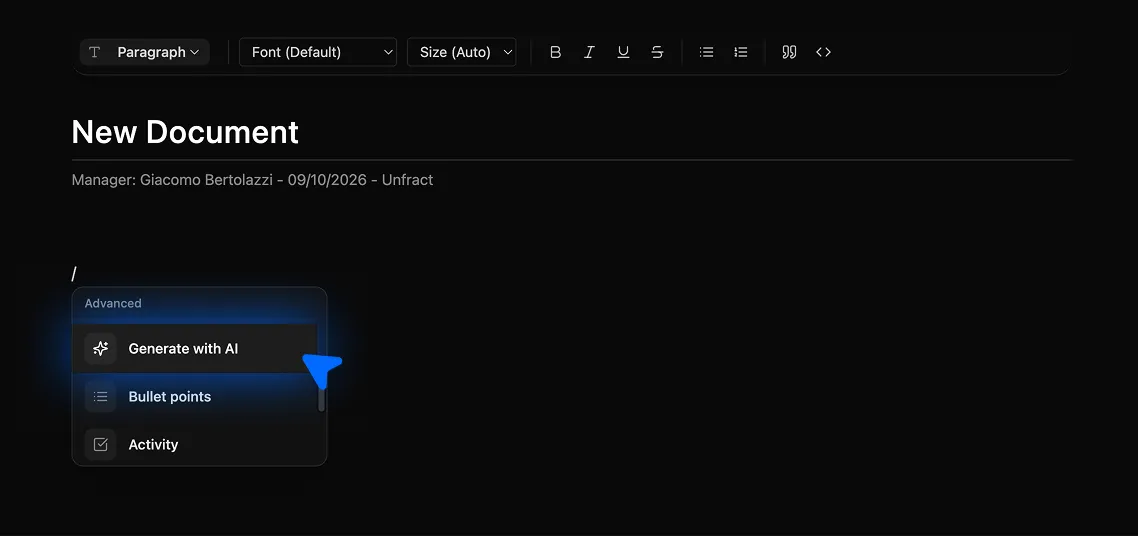
The integrated text editor offers advanced formatting features. It provides tools for managing structured heading styles, formatted lists, quote blocks, data tables, and source code panes with automatic syntax highlighting for over twenty programming languages. Using the slash (/) keyboard shortcut, you can quickly access a context menu for inserting complex elements without interrupting your writing flow.
Media Management and Storage Allocation
Inserting images, audio files, videos, and attached documents into your documentation is done directly via drag-and-drop or selection from disk. Each multimedia asset processed by the editor is uploaded to Unfract's cloud storage infrastructure, storing the exact path and associating the byte footprint with the relevant workspace.
If a document containing multimedia assets is deleted, the platform automatically initiates a cascade deletion process for the associated files stored in the bucket. This mechanism prevents the accumulation of orphaned files in storage and ensures that the storage quota displayed in the dashboard always accurately reflects the space actually occupied by active documents.
AI Assistant Integration: Cloud and Local Processing
The text editor integrates an artificial intelligence assistant that can be invoked directly from the writing interface. Users can select portions of text and ask the AI to summarize concepts, vary the tone of voice, correct spelling, translate content, or automatically generate new paragraphs from a short text expressed in natural language.
For text generation, users can choose between using the advanced cloud models in the Gemini suite or running local models based on WebLLM technology (such as Gemini Nano) integrated directly into the browser. Running local models leverages the computing power of the user's device, ensuring complete data confidentiality and avoiding any consumption of the workspace's AI credits.
Time Management, Calendar and Reservations
Personal agenda management and public booking pages
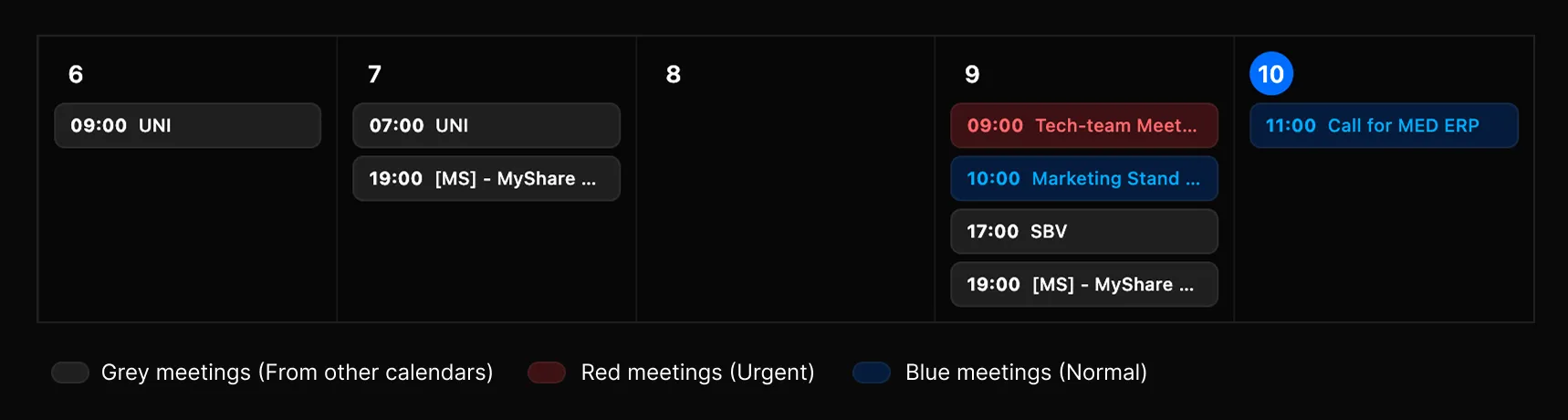
The Calendar module (/calendar) manages the temporal dimension of work, operating at the individual user level. The interface adapts to different planning needs, offering daily, weekly, monthly, and yearly views. Unlike other Unfract application modules, events created in the personal calendar remain linked to the user's profile rather than to individual projects, ensuring a comprehensive overview of one's work commitments.
Each user can configure their own public booking page (/book/[userId]). Through their profile settings, they can define working days, available time slots, and fixed appointment durations. By sharing the public link externally, clients and partners can view available appointments in real time and independently book appointments, receiving automatic email confirmations.
Synchronization with external providers (Google Calendar and Outlook)
To prevent overlaps and centralize time management, Unfract offers two-way synchronization with major external calendar services. Integration with Google Calendar is via OAuth 2.0, while connection with Microsoft Outlook uses the Microsoft Graph API. Events imported from these platforms are displayed in the Unfract calendar in read-only mode.
When planning a new local event, users can choose to automatically generate a video conference link using active integrations with Google Meet or Microsoft Teams. The platform handles notifications to external guests and allows for standard export of appointments in .ics format for maximum compatibility with any email client.
Meetings Module: Transcription and AI Post-Processing
Recording, real-time transcription and Picture-in-Picture mode
The Meetings module (/meetings) transforms work meetings into structured information resources. During a meeting, users can start audio recording directly from their browser using the Web Speech API to obtain a real-time transcription of the speech. To allow participants to consult other documents or tabs on the platform without interrupting the meeting, the interface supports Picture-in-Picture (PiP) viewing mode.
At the end of the session, the recorded audio stream is compressed and securely saved to the project's storage infrastructure. The system simultaneously sends the audio file and the raw transcript to the cloud AI engine, starting the automatic post-processing phase of the content.
Automatic processing and intelligent conversion into tasks
The post-meeting process produces a summary sheet divided into four key sections: the revised full transcript, an executive summary of the topics covered, a log of key decisions, and a list of operational activities that emerged. Each activity identified by the AI includes the name of the alleged perpetrator and an estimated completion time.
Within the meeting details page, the user has direct commands to transform each extracted decision or action into a real task on the project Kanban Board. The generated task card maintains a permanent link to the original meeting, allowing the verbal context in which the decision was made to be traced at any time.
Failure Management and Audio Retention Policies
In the event of a temporary network or cloud AI generation service downtime, the platform activates an emergency save mode (fallback). This procedure ensures that the audio track and text of the raw transcript are stored in the project database without data loss. The user can request intelligent reprocessing of the meeting at a later time with a single click.
Recorded audio files are memory-intensive. To avoid unwanted workspace quota congestion, the system allows you to configure Time-To-Live (TTL) policies for storage buckets. After the set period expires, the audio track is removed from storage, while the text transcript and generated task cards remain permanently saved in the project.
Collaborative Communication and Integrated Chat
Project channel structure and direct messaging
The Chat module (/chat) offers a synchronous communication environment integrated into the work environment. The conversation space is divided into two main types: thematic Channels related to the active project (public or private) and Direct Messages for individual interactions between members of the organization. The list of available contacts is automatically populated based on users belonging to the active organization.
Within conversations, users can exchange formatted text, images, voice notes, code snippets, and file attachments. The chat supports advanced syntactic mentioning: in addition to mentioning colleagues by typing '@', you can insert dynamic links to specific project tasks, knowledge base documents, or meeting recordings, allowing participants to directly access the cited resources.
Message deletion policies and resource cleanup
Managing privacy and storage space in chat provides two different ways to delete messages. The local deletion option ("Delete for me") removes the content from the view of the user who executes it, leaving the conversation intact for other participants and preserving any attached files stored in the system.
The global delete option ("Delete for Everyone") permanently deletes the message from the entire platform, removes its media attachments from the storage bucket, and instantly updates the workspace's storage space counter. Deleting a chat channel completely deletes all sent messages and simultaneously purges all media exchanged within the room.

AI Hub and Contextual Project Assistant
Dynamic Context Architecture and Targeted Responses
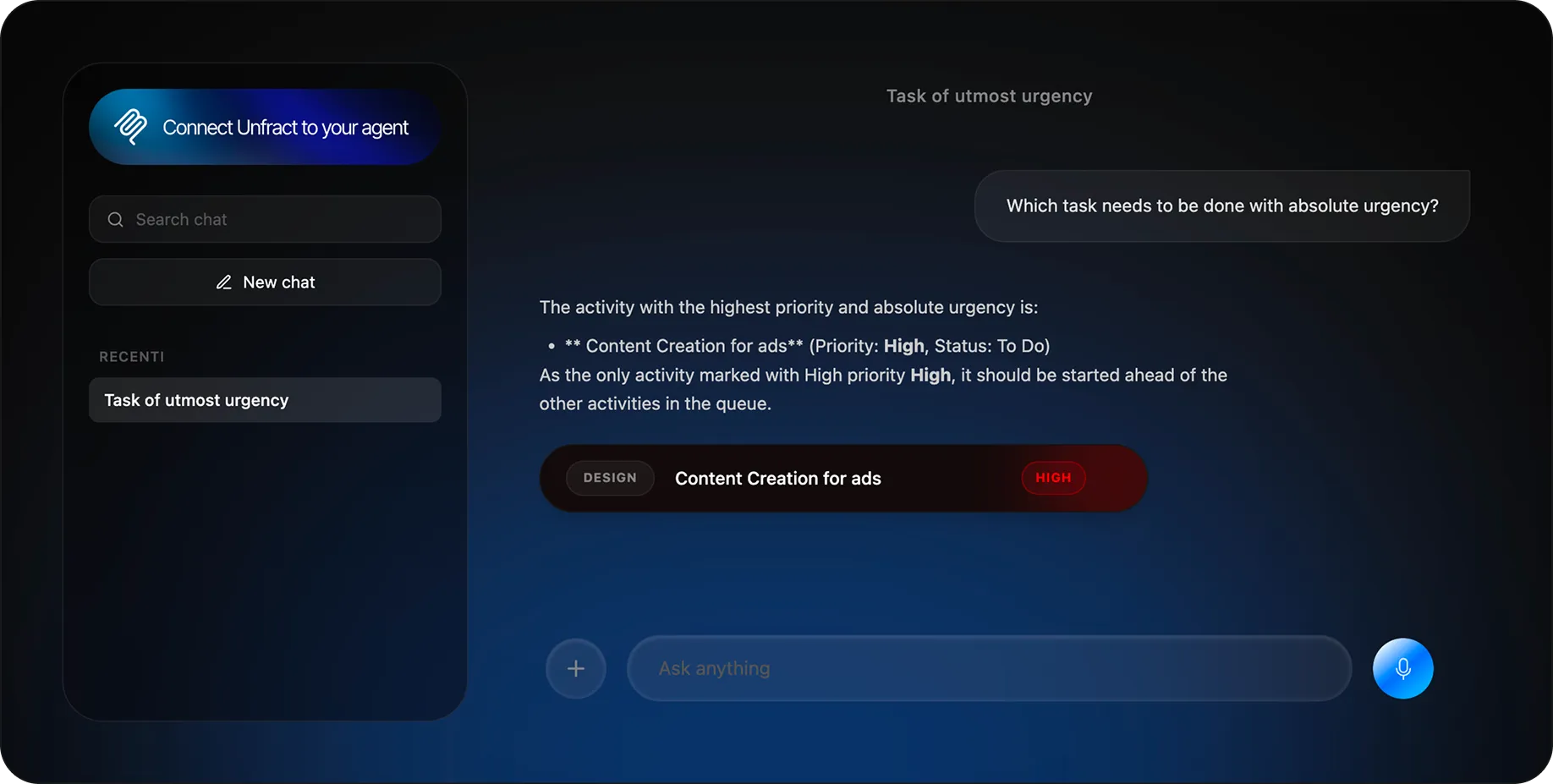
The AI Hub (/ai-hub) is the control center for Unfract's integrated artificial intelligence. Unlike generic chat systems, the AI Hub works by building a real-time information context based on the active project. With each user interaction, the assistant analyzes the overall work status, the Kanban Board column structure, the list of open tasks, due dates, and assigned priority levels.
To ensure maximum relevance of the analysis, the system automatically excludes all tasks marked as completed ('Done') from the context sent to the AI. This approach allows the user to ask complex questions about the current workload, identify bottlenecks, or request executive summaries, obtaining responses that are strictly aligned with the actual project situation. Conversations in the AI Hub remain private and confidential to the individual user.
Automatically generating and executing actions on Tasks
The AI Hub isn't limited to passive information analysis; it also has operational capabilities on the project database. When the assistant identifies the opportunity to create a new task in the conversation and generates a compliant data structure, the platform intercepts the command, identifies the first useful column in the project board, and automatically creates the card in Firestore.
Within the chat flow, the response code is replaced by an interactive chip identified by the tag [TASK:id]. By clicking on the chip, the user can immediately open the details panel of the newly generated card to check the assigned metadata or make changes. This mechanism eliminates the time required to manually enter tasks that emerge during brainstorming sessions with AI.
Computing Plans: Cloud Computing vs. Local WebLLM Models
To meet different privacy and cost control needs, the AI Hub allows you to choose the desired processing engine. By selecting Cloud models (Gemini suite), the platform offers maximum reasoning and synthesis performance, scaling AI credits from the workspace's monthly budget. Cloud calls are routed via protected server APIs that prevent access keys from being exposed to the user client.
By selecting local models based on WebLLM (such as Gemini Nano), natural language processing occurs entirely within the browser, leveraging the hardware acceleration of the device's graphics card. Using local models guarantees complete confidentiality of the processed data and does not consume any cloud credits, offering a free, unlimited alternative for everyday consultation tasks.
Monitoring Resources, Quotas and Cloud Infrastructure
Detailed Workspace Storage Reporting
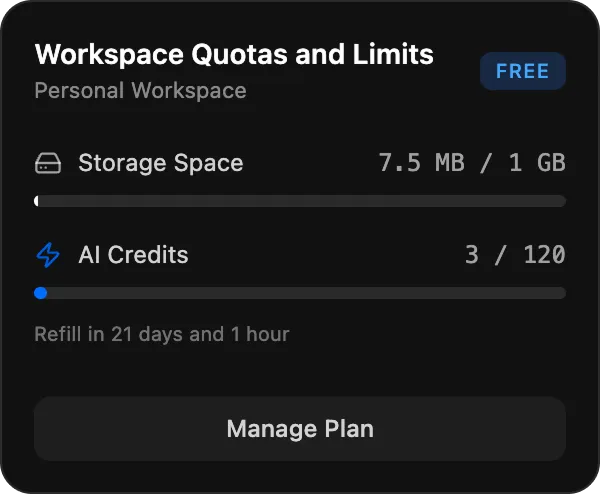
You can monitor your company's resource usage at any time by selecting the Usage button in the application's header. The dashboard provides transparent reporting of storage usage compared to the limits set by your plan. Storage usage includes all files uploaded to the various modules: knowledge base documents, task attachments, chat media, CRM images, meeting audio recordings, and workspace graphic customizations.
Unlike traditional systems that approximate file sizes, Unfract tracks the exact footprint in bytes for each uploaded asset. Small files are accurately accounted for without being rounded to zero, ensuring a perfect match between the data recorded in the database and the actual space occupied in cloud buckets.
Monitoring, resetting and attribution of AI credits
AI credits are the unit of measurement for the use of generative cloud services. The credit count is deducted for each request involving Gemini Cloud models, such as document summarization, meeting transcription, AI Hub analysis, and CRM prospect research. Processing performed using local WebLLM models does not impact this counter in any way.
Credit counters are reset and monthly quotas are reset automatically on the first day of each calendar month in UTC time. Consumption is allocated according to a strict attribution hierarchy: the system first associates the request with the workspaceId identifier in the metadata, then with the active project relationship, and finally with the current workspace selected in the user session.
Technology infrastructure, Firebase and third-party integrations
Unfract's technological architecture is based on a modern and highly scalable cloud ecosystem. The main backend is built on the Firebase infrastructure, which provides secure authentication services, a real-time NoSQL database (Firestore) for application data persistence, and Cloud Storage for distributed media management.
Integrations with the Google ecosystem enable single sign-on support, calendar synchronization, and access to the Gemini suite's language models. Integration with the Microsoft environment leverages Microsoft Graph APIs to connect to Outlook and Teams, while payment and subscription management is handled by the Stripe infrastructure managed via secure webhooks.
Integrated Operational Scenarios, Security and Troubleshooting
End-to-end cross-functional workflows
Unfract's true operational power lies in its ability to seamlessly integrate its various application modules into cross-functional workflows. A typical scenario involves transforming a business meeting into actionable tasks. The user initiates recording in the Meetings module; upon completion, the AI engine transcribes the audio, generates the minutes, and extracts strategic decisions. The operator validates the proposals and, with a single command, creates the corresponding cards on the project Kanban Board, assigning them to the respective managers with deadlines transmitted to the Calendar.
A second integrated scenario involves sales development within the CRM. The sales team identifies a prospective company and activates AI-based prospect research to enrich the database. Once the opportunity is qualified, the lead is converted into an account, contact, and deal in the pipeline. At the same time, a dedicated chat channel is opened for the customer and a presentation appointment is scheduled via the seller's public booking page.
Security measures and access hardening
Information protection and corporate data integrity are ensured by multiple layers of security. Each request sent to the platform requires prior user authentication and validation of access privileges associated with the active Workspace. To prevent unauthorized access in highly complex organizations, administrators are recommended to adopt a permissions assignment policy based on the principle of least privilege, initially assigning new users to read-only roles.
At the database level, security rules check record ownership before allowing write or delete operations. When planning enterprise deployments in multi-tenant environments, it's recommended to periodically harden Firestore rules to ensure project isolation (projectId) remains intact even when direct API calls are made from outside the user interface.
Troubleshooting Guide
If you experience visual discrepancies or data loading issues, we recommend following some standard diagnostic procedures. If the Usage panel counters don't show the expected updates after deleting large files, you should check that the current project is correctly associated with the active workspace, reload the page to clear the browser cache, and check the development console for network errors to the Firestore servers.
If you encounter audio transcription issues within the Meetings module, ensure your browser supports the Web Speech API (Chromium-based browsers are recommended) and that microphone access permissions have been granted. If the interface translation is partial or inconsistent, you can restore the desired language by accessing your profile settings and updating the locale preference (NEXT_LOCALE).